Showing posts with label iOS. Show all posts

iPhone supported household utility devices


When you hear the term "smart home," the first thing you might think of is Amazon's Echo.
While Amazon does have a major lead in the smart-home hub space, Apple has recently stepped up their game. 
They've given products that fit their "Home Kit" certification their own app, called "Home," in iOS 10. 
So if you're more comfortable with Siri and the iPhone than Amazon and Alexa, these four products can help you get your smart home started.

A smart thermostat


If you haven't given a thought to upgrading your old thermostat to smart one, it's a worthwhile investment. Trust me.Of course, you can adjust the temperature of your place using your phone. That's relatively standard in the smart-thermostat world. Honeywell takes things a step further, though, by creating a geofence around your house.

That geofence let's the thermostat know whether you're home or away, so it can adjust the temperature accordingly, and conserve energy.

A smart lock


If you want to keep your home secure from outsiders, but more easily accessible by friends and family, you'll want a smart lock.

Like Honeywell's thermostat, August senses when your phone is near, and activates accordingly. Instead of creating a geofence, the lock puts out a Bluetooth signal. When your phone is near and connects, it unlocks. 

You can also lock or unlock your door from wherever you are through August's app. This lets you let friends or family in without giving them a set of your keys. By using this lock, you'll also have a log of everyone who entered your house.

Philips Hue bulbs


Being able to control the lights in a room with your voice is a game-changer, and once you get used to it, there's no going back. 

These are the multi-color bulbs, too. So in addition to being able to control whether your lights are on or off, you can control whether they're normal or fun-colored through Siri. If you're looking for only one smart-home accessory to start off with, these lights are it. They represent both the potential fun, and utility, of smart-home products.

A smart plug


Just plug your appliances into the smart plug, and the smart plug into the outlet. That's it. Elgato's plug connects to your phone via Bluetooth; once connected you can monitor the energy usage from the plug and turn it on and off. 

That's not as fancy as the tricks you can pull off with true smart appliances, but for smaller products, it's perfect. For me, I can turn on my electric tea kettle from bed and have boiled water waiting for me by the time I'm done brushing my teeth.


Apple fixed an annoying battery bug and didn't tell people for weeks


Have you had your iPhone 6 shut down randomly with 30% battery left? You're not alone.
Many Apple users have been reporting this annoying battery bug, but there was seemingly no fix for it - and Apple refused to acknowledge it was an issue.
Until now.
Until now.
Apple says in a statement first reported by TechCrunch that it fixed the bug in the most recent version of iOS 10.2.1., which was released on January 23.
Here's Apple's comment on the matter, provided to Business Insider:
With iOS 10.2.1, Apple made improvements to reduce occurrences of unexpected shutdowns that a small number of users were experiencing with their iPhone. iOS 10.2.1 already has over 50% of active iOS devices upgraded and the diagnostic data we've received from upgraders shows that for this small percentage of users experiencing the issue, we're seeing a more than 80% reduction in iPhone 6s and over 70% reduction on iPhone 6 of devices unexpectedly shutting down.
We also added the ability for the phone to restart without needing to connect to power, if a user still encounters an unexpected shutdown. It is important to note that these unexpected shutdowns are not a safety issue, but we understand it can be an inconvenience and wanted to fix the issue as quickly as possible. If a customer has any issues with their device they can contact AppleCare.
So if your iPhone is shutting down randomly, you should upgrade to the latest version of iOS as soon as possible.
Anecdotally, around the Business Insider office, the recent software update did help the problem. 
To recap: A Chinese consumer protection agency late last year started saying that there was an issue with iPhones that caused them to shut down with 30% battery . Apple said it applied only to iPhone 6S models and offered certain devices a discounted replacement battery. But users of other devices, like the iPhone 6 and 6 Plus, still said it affected them .
But now it's been fixed by a software update. Older batteries can work inconsistently, and Apple is constantly looking at its aggregated data to see if there are issues and how it can improve them.
This week Apple posted a job listing for a "big data senior scientist" working on battery development to "prevent a significant customer event by monitoring trends and working with cross functional engineering to resolve issue before significant customer event." But Apple is constantly hiring, and the timing is probably a coincidence.

Why Apple's new iPhone 7 is costly in India?

Apple Inc.'s new iPhone 7 smartphones go on sale Friday in the U.S. at a starting price of $649. They won’t be available in India until next month, and when they do land their base price will be close to $250 more expensive.
Apple has been trying to grab a bigger slice of the growing Indian market by allowing financing for consumers, offering older models for lower prices, and has even petitioned to sell refurbished phones in India, according to government officials.
So why is it squeezing India’s value-for-money conscious consumers on the price of its flagship phones?
In India Apple has set a maximum retail price of about 60,000 rupees, or around $900, for the iPhone 7 phone when it starts selling in India Oct. 7. That’s more than 35% more than the sticker price of the phones in America.
Why the difference? One contributor is taxes. The Indian base price already has sales taxes blended in while the U.S. price is before sales tax. Another contributor is distribution networks. Apple relies on third-party companies to sell phones in India, which work in their own profit margins. Apple also has to set a price containing a buffer for movements in the value of the rupee.
The comparatively high price of the new device underscores challenges the Cupertino, Calif. company faces in the world's second-most-populous country: It is attempting to sell its high-end devices in a nation where most consumers can only afford smartphones that cost less than $150.Even Apple's older models, such as the iPhone 5s, which costs about $300, are relatively expensive and haven't proven to be big hits.
Apple Chief Executive Tim Cook, however, is keen to boost sales in India as demand weakens in China.
Apple is seeking government permission to open its own stores and sell goods online in India in order to supplement Indian-owned distribution firms and retailers.
But a senior government official says Apple is still mulling whether or not it would be able to comply with local-sourcing requirements that would be part of such a deal.

For now, fans of Apple's flagship devices will just have to pay a little more.

WhatsApp now has a PC version


WhatsApp introducing a desktop app so you have a new way to stay in touch anytime and anywhere - whether on your phone or computer at home or work. Like WhatsApp Web, WhatsApp's desktop app is simply an extension of your phone: the app mirrors conversations and messages from your mobile device.
The new desktop app is available for Windows 8+ and Mac OS 10.9+ and is synced with WhatsApp on your mobile device. Because the app runs natively on your desktop, you'll have support for native desktop notifications, better keyboard shortcuts, and more.


To download the app, visit https://www.whatsapp.com/download from your desktop browser. Then, open the app and scan the QR code using the WhatsApp app on your phone (look for WhatsApp Web menu under Settings).
Just like WhatsApp Web, the new desktop app lets you message with friends and family while your phone stays in your pocket.

A no. of keyboard shortcuts 


Ctrl(cmd on mac)+Shift+M
Mute conversation
Ctrl+Shift+U
Change Read/Unread status
Ctrl +N
Start a new chat
Ctrl+Shift+N
Start a new group
Ctrl+P
Open profile status
Ctrl+Z
Undo
Ctrl+Shift+Z
Redo
Ctrl+C
Copy
Ctrl+X
Cut
Ctrl+V
Paste
Ctrl+A
Select all
Ctrl+F
Search
Ctrl+Shift+=
Zoom in
Ctrl+0
Actual size
Ctrl+-
Zoom out
Ctrl+Shift+]
Next chat
Ctrl+Shift+[
Previous chat
Ctrl+E
Archive chat
Ctrl+Backspace
Delete chat
Close
Alt+F4


WhatsApp can be used right from your desktop without a browser. To install WhatsApp on your computer, access our website from your computer’s browser. WhatsApp can only be installed on your computer if your operating system is Windows 8 (x64) (or newer) or Mac OSX 10.9 (or newer). For all other operating systems, you may use WhatsApp on your browser here.

How to send Files through WhatsApp ?


WhatsTools – Advanced file sharing through Whatsapp like instant messengers.You can share your files upto 1GB. 
 Via WhatsApp: 
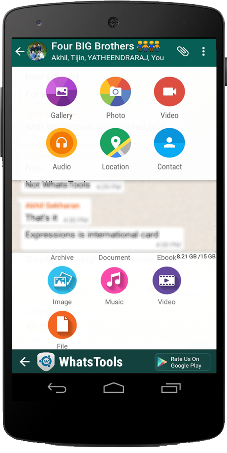
 Click on Attach button in chat window to show Whats Tools share menu. Click on the received message to open Download file popup.(We need your permission to show our menu on the click of attach button using an accessibility service)
Any File Type:
 Share any type of file Archives, Docs, EBooks, Music, Images, Gif Videos of up to 1 GB via any Instant messaging app installed in your phone.
 Up To 1GB:
 Many of the IM's have restriction on size of file sending (16MB) whereas WhatsTools allows you to send files of up to 1 GB to any of your instant messaging app's contact.
 Pausing/Resuming:
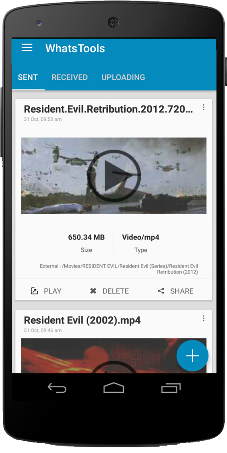
 Uploading and downloading can be paused as well as resumed. In case of a network failure, you will be able to resume the upload/download without losing the current progress.
 Preview video before downloading:  
Thumbnails of video at different durations can be previewed before downloading the actual video which will help you decide whether to download the video.
 Cross-Platform:  
Send file to IPhone, Windows Phone & Blackberry. If the receiver is on another platform, the link will be opened in the browser and the user can download file from the webpage.
Share to Anywhere:
 File sharing is not limited to SMS or IM's. You can copy the download link and share it anywhere through SMS, Email or Social Media Platforms. Anyone with the link can download the file from any platform using a browser.
Peace of mind:
 All data is guarded behind HTTPS/SSL encryption. We connect to your Google Drive™ with your permission to transfer your files. You can view & manage these files from your Google™ drive as well.
 Inbuilt Media Support:  
WhatsTools support playing of GIF and Music files within the app itself. The app has inbuilt Video player as well for common video formats.

Initial Setup

1. Enable Accessibility Service.

2. Connect to your Google™ Drive.

3. That's it. Start sharing files.
Note:-
➤ Sending virus/malicious files are against the terms of service of Google™ Drive. If file is infected, the receiver wont be able to download it.
➤App have non-intrusive ads. So no annoying pop-up and full-screen ads.

It's an *Unofficial App - they have no relationship with any Messenger apps and its related trademarks in any manner. This application is not endorsed by or affiliated with any other Instant messaging apps. Their name, trademark, and other aspects of the other apps are trademarked and owned by their respective owners.*
Kindly give your valuable feedback. Please reach at support@whatstools.com in case of any bugs.They are working hard to make your experience better. You can also get in touch throgh +91-9061641149.