Showing posts with label Android. Show all posts

WhatsApp now has a PC version


WhatsApp introducing a desktop app so you have a new way to stay in touch anytime and anywhere - whether on your phone or computer at home or work. Like WhatsApp Web, WhatsApp's desktop app is simply an extension of your phone: the app mirrors conversations and messages from your mobile device.
The new desktop app is available for Windows 8+ and Mac OS 10.9+ and is synced with WhatsApp on your mobile device. Because the app runs natively on your desktop, you'll have support for native desktop notifications, better keyboard shortcuts, and more.


To download the app, visit https://www.whatsapp.com/download from your desktop browser. Then, open the app and scan the QR code using the WhatsApp app on your phone (look for WhatsApp Web menu under Settings).
Just like WhatsApp Web, the new desktop app lets you message with friends and family while your phone stays in your pocket.

A no. of keyboard shortcuts 


Ctrl(cmd on mac)+Shift+M
Mute conversation
Ctrl+Shift+U
Change Read/Unread status
Ctrl +N
Start a new chat
Ctrl+Shift+N
Start a new group
Ctrl+P
Open profile status
Ctrl+Z
Undo
Ctrl+Shift+Z
Redo
Ctrl+C
Copy
Ctrl+X
Cut
Ctrl+V
Paste
Ctrl+A
Select all
Ctrl+F
Search
Ctrl+Shift+=
Zoom in
Ctrl+0
Actual size
Ctrl+-
Zoom out
Ctrl+Shift+]
Next chat
Ctrl+Shift+[
Previous chat
Ctrl+E
Archive chat
Ctrl+Backspace
Delete chat
Close
Alt+F4


WhatsApp can be used right from your desktop without a browser. To install WhatsApp on your computer, access our website from your computer’s browser. WhatsApp can only be installed on your computer if your operating system is Windows 8 (x64) (or newer) or Mac OSX 10.9 (or newer). For all other operating systems, you may use WhatsApp on your browser here.
How to send Files through WhatsApp ?


WhatsTools – Advanced file sharing through Whatsapp like instant messengers.You can share your files upto 1GB. 
 Via WhatsApp: 
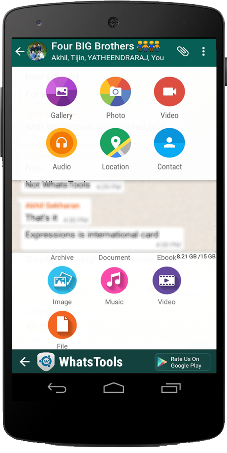
 Click on Attach button in chat window to show Whats Tools share menu. Click on the received message to open Download file popup.(We need your permission to show our menu on the click of attach button using an accessibility service)
Any File Type:
 Share any type of file Archives, Docs, EBooks, Music, Images, Gif Videos of up to 1 GB via any Instant messaging app installed in your phone.
 Up To 1GB:
 Many of the IM's have restriction on size of file sending (16MB) whereas WhatsTools allows you to send files of up to 1 GB to any of your instant messaging app's contact.
 Pausing/Resuming:
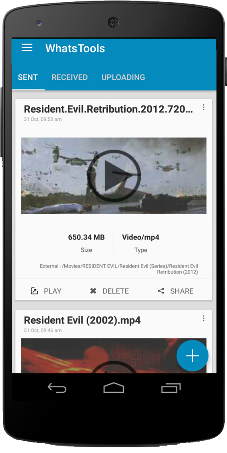
 Uploading and downloading can be paused as well as resumed. In case of a network failure, you will be able to resume the upload/download without losing the current progress.
 Preview video before downloading:  
Thumbnails of video at different durations can be previewed before downloading the actual video which will help you decide whether to download the video.
 Cross-Platform:  
Send file to IPhone, Windows Phone & Blackberry. If the receiver is on another platform, the link will be opened in the browser and the user can download file from the webpage.
Share to Anywhere:
 File sharing is not limited to SMS or IM's. You can copy the download link and share it anywhere through SMS, Email or Social Media Platforms. Anyone with the link can download the file from any platform using a browser.
Peace of mind:
 All data is guarded behind HTTPS/SSL encryption. We connect to your Google Drive™ with your permission to transfer your files. You can view & manage these files from your Google™ drive as well.
 Inbuilt Media Support:  
WhatsTools support playing of GIF and Music files within the app itself. The app has inbuilt Video player as well for common video formats.

Initial Setup

1. Enable Accessibility Service.

2. Connect to your Google™ Drive.

3. That's it. Start sharing files.
Note:-
➤ Sending virus/malicious files are against the terms of service of Google™ Drive. If file is infected, the receiver wont be able to download it.
➤App have non-intrusive ads. So no annoying pop-up and full-screen ads.

It's an *Unofficial App - they have no relationship with any Messenger apps and its related trademarks in any manner. This application is not endorsed by or affiliated with any other Instant messaging apps. Their name, trademark, and other aspects of the other apps are trademarked and owned by their respective owners.*
Kindly give your valuable feedback. Please reach at support@whatstools.com in case of any bugs.They are working hard to make your experience better. You can also get in touch throgh +91-9061641149.


Root Adnroid device with out Computer


"Root"  is the most prominent method to access the superuser rights on the android device.There are so many methods to Root android device.But "Kingroot" makes every android user more happy,Because it can root your device in few minutes.We need to use PC to root your android device but they are older methods, Now we  have "Kingroot" to root your android device.Just download "Kingroot" app just tap on the button given then your phone is rooted.Its completely free and simple.


Why should we root our android devices?


Word "Root" means go inside or go deeper.We're commonly using our android smartphones to Chat,Capture photos,Browse internet or something else.If you're using android device for these given purposes then you don't need to root your android device.If you want super access on your android device i suggest you to root your device.Super access means you can unlock hidden features of your  phone,you will get better battery life,You can change boot animation of your android icon when you power on your device that all means you can make your android device into super device.Rooting have much benefits than its demerits like any rooting applications can't satisfy you by the guarantee of your android device.

Then we have to discuss how to root your android device using Kingroot app.


Step 1 : Download the app from google play store or download its apk by clicking the download button given below.


Step 2 : Install the app into your phone and open it.

Step 3 :Then tap on the Root button as shown in the figure below.


The rooting process has been started wait for a minute.

Step 4 :


Then your're successfully rooted your android device.
Reboot your device.Then enjoy

5 Security apps for android

In this, I show you the best apps to ensure security to your android smartphone.There are more apps to security but many of them have not sufficient working.These 5 apps protect your phone from all malware,theft,viruses,etc... 

  1. Kaspersky Internet Security
  2. Quick Heal Total Security Free
  3. AVG
  4. Norton Security and anti viruses
  5. Avast
1.Kaspersky Internet Security 

Kaspersky Internet Security for android delivers the latest mobile security technologies,including superior anti theft protection and android antivirus.Kaspersky internet security for android protects your smartphone against theft,loss,viruses and real time internet threats all these features are without impacting your device functions.

                             Download

2.Quick Heal Total Security Free

Quick Heal Total Security not only secure your android smartphone it also care about the loss or theft of your android smartphone.It has enhanced call and sms filter that allow you to block unknown numbers and numbers starting and ending with certain series.Its personal security features helps you in times of emergency by alerting your friends.
  
                                      Download
3. A V G

It ensure quick and easy protection for your android phone.Real Time Security Scanner helps you to protect from downloaded applications and games.Its have task killer,phone locater,real time scanner,app locker and local device wipe.

                        
                                      Download

4.Norton Security & antivirus

It protects your android smartphones from threats and malicious apps,theft or loss,phishing websites.More than this Norton provides a proactive protection against risky apps,apps that leak your personal informations and contents.Norton puts you in control 


                                                       Download

5.Avast Mobile security and Antivirus

Its secure against spyware,unwanted phishing,malware and malicious viruses such as trojan and even it against loss or theft.
It give security for android phone.

                                    Download   

Share this to your friends help them to protect their android smartphones