Showing posts with label Tips & Tricks. Show all posts

WhatsApp now has a PC version


WhatsApp introducing a desktop app so you have a new way to stay in touch anytime and anywhere - whether on your phone or computer at home or work. Like WhatsApp Web, WhatsApp's desktop app is simply an extension of your phone: the app mirrors conversations and messages from your mobile device.
The new desktop app is available for Windows 8+ and Mac OS 10.9+ and is synced with WhatsApp on your mobile device. Because the app runs natively on your desktop, you'll have support for native desktop notifications, better keyboard shortcuts, and more.


To download the app, visit https://www.whatsapp.com/download from your desktop browser. Then, open the app and scan the QR code using the WhatsApp app on your phone (look for WhatsApp Web menu under Settings).
Just like WhatsApp Web, the new desktop app lets you message with friends and family while your phone stays in your pocket.

A no. of keyboard shortcuts 


Ctrl(cmd on mac)+Shift+M
Mute conversation
Ctrl+Shift+U
Change Read/Unread status
Ctrl +N
Start a new chat
Ctrl+Shift+N
Start a new group
Ctrl+P
Open profile status
Ctrl+Z
Undo
Ctrl+Shift+Z
Redo
Ctrl+C
Copy
Ctrl+X
Cut
Ctrl+V
Paste
Ctrl+A
Select all
Ctrl+F
Search
Ctrl+Shift+=
Zoom in
Ctrl+0
Actual size
Ctrl+-
Zoom out
Ctrl+Shift+]
Next chat
Ctrl+Shift+[
Previous chat
Ctrl+E
Archive chat
Ctrl+Backspace
Delete chat
Close
Alt+F4


WhatsApp can be used right from your desktop without a browser. To install WhatsApp on your computer, access our website from your computer’s browser. WhatsApp can only be installed on your computer if your operating system is Windows 8 (x64) (or newer) or Mac OSX 10.9 (or newer). For all other operating systems, you may use WhatsApp on your browser here.

How to create Sitemap of your Website?

What is Sitemap?

A site map (or sitemap) is a list of pages of a web site accessible to crawlers or users. It can be either a document in any form used as a planning tool for Web design, or a Web page that lists the pages on a Web site, typically organized in hierarchical fashion.
Typically, site maps are organized hierarchically, breaking down the Web site's information into increasingly specific subject areas. There are a number of different types of site maps: organizational chart site maps are quite similar in appearance to a traditional table of contents; others, based on a perspective view of the site, are like a three dimensional model with individual pages upright, like index cards, arranged in sections and linked by lines. Structured Graph Format (SGF) site maps use an XML format language to describe Web site content, and a Java SGF viewer to interact with the data. There are a number of companies making site mapping products; generally, these don't require Web design skills - such as HTML or XML ability - on the part of the user. Popular site mapping products include TheBrain's SiteBrain, Inxight Software's Tree Studio, IBM's Java-based Mappuccino, and Dynamic Diagram's eponymous product. Site maps can also be created using more general Web site management tools, such as Visual Web, or Microsoft's Site Analyst. 


How to create sitemap for your website ?


1).Open your website in your browser
                              

2).Type sitemap.xml after the Web address (URL)

3).then you can see the page like this ..

Share this to your groups.... #MS


How to send Files through WhatsApp ?


WhatsTools – Advanced file sharing through Whatsapp like instant messengers.You can share your files upto 1GB. 
 Via WhatsApp: 
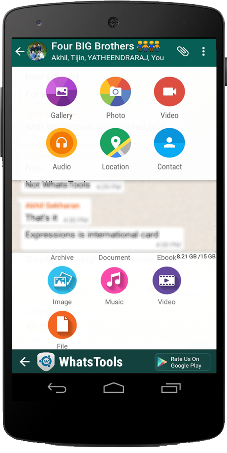
 Click on Attach button in chat window to show Whats Tools share menu. Click on the received message to open Download file popup.(We need your permission to show our menu on the click of attach button using an accessibility service)
Any File Type:
 Share any type of file Archives, Docs, EBooks, Music, Images, Gif Videos of up to 1 GB via any Instant messaging app installed in your phone.
 Up To 1GB:
 Many of the IM's have restriction on size of file sending (16MB) whereas WhatsTools allows you to send files of up to 1 GB to any of your instant messaging app's contact.
 Pausing/Resuming:
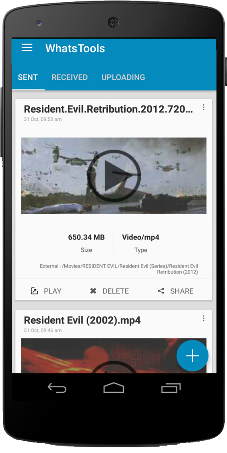
 Uploading and downloading can be paused as well as resumed. In case of a network failure, you will be able to resume the upload/download without losing the current progress.
 Preview video before downloading:  
Thumbnails of video at different durations can be previewed before downloading the actual video which will help you decide whether to download the video.
 Cross-Platform:  
Send file to IPhone, Windows Phone & Blackberry. If the receiver is on another platform, the link will be opened in the browser and the user can download file from the webpage.
Share to Anywhere:
 File sharing is not limited to SMS or IM's. You can copy the download link and share it anywhere through SMS, Email or Social Media Platforms. Anyone with the link can download the file from any platform using a browser.
Peace of mind:
 All data is guarded behind HTTPS/SSL encryption. We connect to your Google Drive™ with your permission to transfer your files. You can view & manage these files from your Google™ drive as well.
 Inbuilt Media Support:  
WhatsTools support playing of GIF and Music files within the app itself. The app has inbuilt Video player as well for common video formats.

Initial Setup

1. Enable Accessibility Service.

2. Connect to your Google™ Drive.

3. That's it. Start sharing files.
Note:-
➤ Sending virus/malicious files are against the terms of service of Google™ Drive. If file is infected, the receiver wont be able to download it.
➤App have non-intrusive ads. So no annoying pop-up and full-screen ads.

It's an *Unofficial App - they have no relationship with any Messenger apps and its related trademarks in any manner. This application is not endorsed by or affiliated with any other Instant messaging apps. Their name, trademark, and other aspects of the other apps are trademarked and owned by their respective owners.*
Kindly give your valuable feedback. Please reach at support@whatstools.com in case of any bugs.They are working hard to make your experience better. You can also get in touch throgh +91-9061641149.


How to highlight your blogger post?


Its important to post frequently in order to encourage readers to come back. Of course, the more you post, the more quickly your posts slip down into the archives, making it harder for your readers to discover everything you’ve posted that they might be interested in.

To help make it easier to showcase the posts you want your readers to see, Blogger created a new gadget called Featured Post. With Featured Post, you can choose posts you’ve shared on your blog and highlight them wherever you’d like.


How ?

Open the Layout section in your blogger dashboard then click on the add gadget 


Then you can see a pop window like the given one.


then you can see a widget named Featured post.Then click on the "+" button then another window will come out.


Then choose a name to your gadget.Then you can choose the post snippet tick on the box given.
Then you can choose the featured post by searching or choosing by label.Then save your gadget.
Then view your blog.Featured post widget should be there ☺ 

How to add Facebook page widget into Blogger?

How to add Facebook page widget into Blogger?
The Page plugin lets you easily embed and promote any Facebook Page on your website. Just like on Facebook, your visitors can like and share the Page without having to leave your site.

Visit this website to make your page's Widget Page Plugins

And the page says like this :-)

How to add the Page Plugin to your Website

The standard configuration of the Page plugin includes only the header and a cover photo. This size is ideal for promoting your Page in a small space, such as the top of a sidebar.
<div class="fb-page" data-href="https://www.facebook.com/facebook"
  data-width="380" data-hide-cover="false" data-show-facepile="false" 
  data-show-posts="false"></div>

Adaptive Width

The plugin will by default adapt to the width of its parent container on page load (min. 180px / max.500px), useful for changing layout:
<div style="width: 190px;">
    <!-- Page plugin's width will be 190px -->
  <div class="fb-page" data-href="{url}" data-width="420"></div>
</div>
If the width of the parent element is bigger than the Page plugin's width it will maintain the value defined in data-width:
<div style="width: 600px;">
    <!-- Page plugin's width will be 500px -->
  <div class="fb-page" data-href="{url}" data-width="500"></div>
</div>
The plugin will never be smaller than 180px:
<div style="width: 100px;">
    <!-- Page plugin's width will be 180px -->
  <div class="fb-page" data-href="{url}" data-width="320"></div>
</div>
Adaptive width can be switched off by unchecking Adapt to plugin container width and the plugin will rendered at the specified width irrespective of the parent container.

No Dynamic Resizing

The Page plugin works with responsive, fluid and static layouts. You can use media queries or other methods to set the width of the parent element, yet:
  • The plugin will determine its width on page load
  • It will not react changes to the box model after page load.
If you want to adjust the plugin's width on window resize, you manually need to rerender the plugin.

Show Friend's Faces

Show who likes your Page with real people's profile images rather than just a number. People visting your Page will see a count of friends that like the Page as well as their profile photos.
This option can be activated by checking Show Friend's Faces in the configurator.
<div class="fb-page" data-href="https://www.facebook.com/imdb" 
  data-width="340" data-hide-cover="false" data-show-facepile="true"
  data-show-posts="false"></div>

List Page Posts

You can show posts from the Page's timeline in your Page plugin implementation. This is a great way to keep people up to date with what is going on on your Page.
This option can be activated by checking Show Page Posts in the configurator or adding the attributedata-show-posts="true".
<div class="fb-page" data-href="https://www.facebook.com/instagram" 
  data-width="280" data-hide-cover="false" data-show-facepile="false"
  data-show-posts="true"></div>

Privacy Restricted Pages

Some pages have audiance restrictions by age, country, etc. A warning message is shown when you attempt to configure a Facebook Page which is not visible to everyone.
Although, the warning message will only be visible while configuring the plugin here on developers.facebook.com
If a restricted Facebook Page is embedded, then:
  • Plugin will render normally as expected for those who are not restricted.
  • Plugin would not render at all for those who are restricted.

Adjust Language

You can adjust the language of the Page plugin plugin by loading a localized version of the Facebook JavaScript SDK. When you load the SDK adjust the value js.src to use your locale: Just replaceen_US with your locale, e.g. ru_RU for Russian (Russia):
Example
  js.src = "//connect.facebook.net/ru_RU/sdk.js#xfbml=1&version=v2.3";
Supported locales are referenced in the Facebook Locales XML file. You may need to adjust the width of a Social Plugin to accommodate different languages. You may find more information on ourLocalization & Translation page.

HTTPS Now available to Blogspot


Since 2008, 'Blogger' worked to encrypt the connections between our users and Google servers. Over the years 'Blogger' announced that Search, Gmail, Drive, and many other products have encrypted connections by default, and most recently, 'Blogger' made a similar announcement for Google ads products. 

In this same vein, today 
'Blogger' expanding on the HTTPS Everywhere mission and beginning an initial rollout of HTTPS support for Blogspot. HTTPS is a cornerstone of internet security as it provides several important benefits: it makes it harder for bad actors to steal information or track the activities of blog authors and visitors, it helps check that visitors open the correct website and aren’t being redirected to a malicious location, and it helps detect if a bad actor tries to change any data sent from Blogger to a blog visitor. 

While this initial rollout won’t support all of our Blogger users, 
'Blogger' wanted to take the first step to make HTTPS available for Blogspot; for those users who want to try it early. 
'Blogger' rolling this out gradually and Blogspot authors interested in enabling HTTPS support can begin opting-in today. Simply log into https://www.blogger.com, click on the blog you’d like to make HTTPS enabled, navigate to the Settings page, and select "yes" for "HTTPS Availability". Unfortunately, blogs with custom domains are not supported in this first version. 


Root Adnroid device with out Computer


"Root"  is the most prominent method to access the superuser rights on the android device.There are so many methods to Root android device.But "Kingroot" makes every android user more happy,Because it can root your device in few minutes.We need to use PC to root your android device but they are older methods, Now we  have "Kingroot" to root your android device.Just download "Kingroot" app just tap on the button given then your phone is rooted.Its completely free and simple.


Why should we root our android devices?


Word "Root" means go inside or go deeper.We're commonly using our android smartphones to Chat,Capture photos,Browse internet or something else.If you're using android device for these given purposes then you don't need to root your android device.If you want super access on your android device i suggest you to root your device.Super access means you can unlock hidden features of your  phone,you will get better battery life,You can change boot animation of your android icon when you power on your device that all means you can make your android device into super device.Rooting have much benefits than its demerits like any rooting applications can't satisfy you by the guarantee of your android device.

Then we have to discuss how to root your android device using Kingroot app.


Step 1 : Download the app from google play store or download its apk by clicking the download button given below.


Step 2 : Install the app into your phone and open it.

Step 3 :Then tap on the Root button as shown in the figure below.


The rooting process has been started wait for a minute.

Step 4 :


Then your're successfully rooted your android device.
Reboot your device.Then enjoy

Top 5 alternatives to Google AdSense For Bloggers

Google Adsence

Google AdSence is an easy way to earn money from your online content.Simply display relevant and engaging ads on your website,mobile sites,videos etc. AdSense is a free, simple way to earn money by displaying targeted ads next to your online content. With AdSense, you can show relevant and engaging ads to your site visitors and even customize the look and feel of ads to match your website.


Google adsence alternatives

1)Propeller Ads


Propeller ads is one of the high paying ad network.Automatic ad campaign optimization by country and by website.Highest CPM among ad networks for onclick format.More than 
3000 active ad campaigns worldwide.


  • Banners (728x90, 300x250, 160x600, 120x600 and others)
  • Onclick ads
  • In-banner video (Pre-rolls, mid-rolls, post-rolls, Pre-game)
  • Sliders, Sponsored Links and other ad formats
                           
2)Infolinks

Infolinks is an online advertising platform which offers advertising products for publishers, advertisers and brands. The company's products, including InFrame, InSearch, InTag and InText, were designed to overcome banner blindness.
  • 125000 websites worldwide
  • 3rd largest ad marketplace
  • 2 trillion analyzed keywords
  • 2.5 billion monthly ads views


3)Revenue Hits


RevenueHits help publishers to generate more revenues with state of the art Contextual & Geo targeted Ad serving technology.Our innovative performance base(CPA) Ad network was designed to help publishers to monetize online assers,including toolbars,websites,search,widgets,IM applications and more.RevenueHits help publishers to generate more revenues with state of the art contextual and RevenueHits is owned and operated by MyAdWise Ltd - a privately-held,Israeli-based,start-up company founded in 2008 by a team of experienced tech professinals,finance experts and succesful online marketers.Our technology allows us to scan millions of online ads and analyze their performance over time.Our huge inventory of ads is comprised of effective text and display ads that promotes performance base offers.By serving these proven ads we help our publishers increase revenue and improve their bottom line.

4)Media.Net

Media.net is highest paying ads optimized across multiple demand sources.Custom and native Ad designs to maintain a consistent user experience.Simple implementation with a  2 line JS code {java script}.Continous testing and optization to ensure highest performance.No changes required to site layout.Replace and existing IAB unit or create additional ad inventory with custom units


5)Chitika

Chitika Inc. is a search targeted advertising company.It is located in Westborough,Massachusetts,USA.The name chitika means "in a snap" in Telugu language (Indian language).Its account is free.We can choose ad type.A low payment threshold.Yahoo and other top quality advertisers